OEM Service CRM Software in Mumbai
T3 OEM Service CRM helps equipment manufacturers manage the complete after-sales lifecycle after dispatch—from installation registration and warranty coverage to AMC contracts, service tickets, spare parts issue, customer visits and service dashboards.

Why OEM Service Businesses Need Connected Service Control
For OEMs, the work does not end after selling or dispatching equipment. Every installed machine, analyser, instrument or device requires warranty tracking, AMC coverage, service history, spare parts control and management visibility.
T3 OEM Service CRM connects installed equipment, customer sites, service tickets, warranty status, AMC contracts and spare parts activity so service teams can take faster and more accurate decisions.
Installed Equipment is the Control Point
Every service call should connect to the correct customer, site, product, serial number, installation date and service history.
Warranty and AMC Decide Service Treatment
Teams need to know whether labour and spare parts are free, covered under AMC or chargeable before completing the ticket.
Spare Parts Must Stay Linked
Compatible spare issues should remain connected with the installation, ticket, coverage decision and final service closure.
Service Visibility Must Be Quick
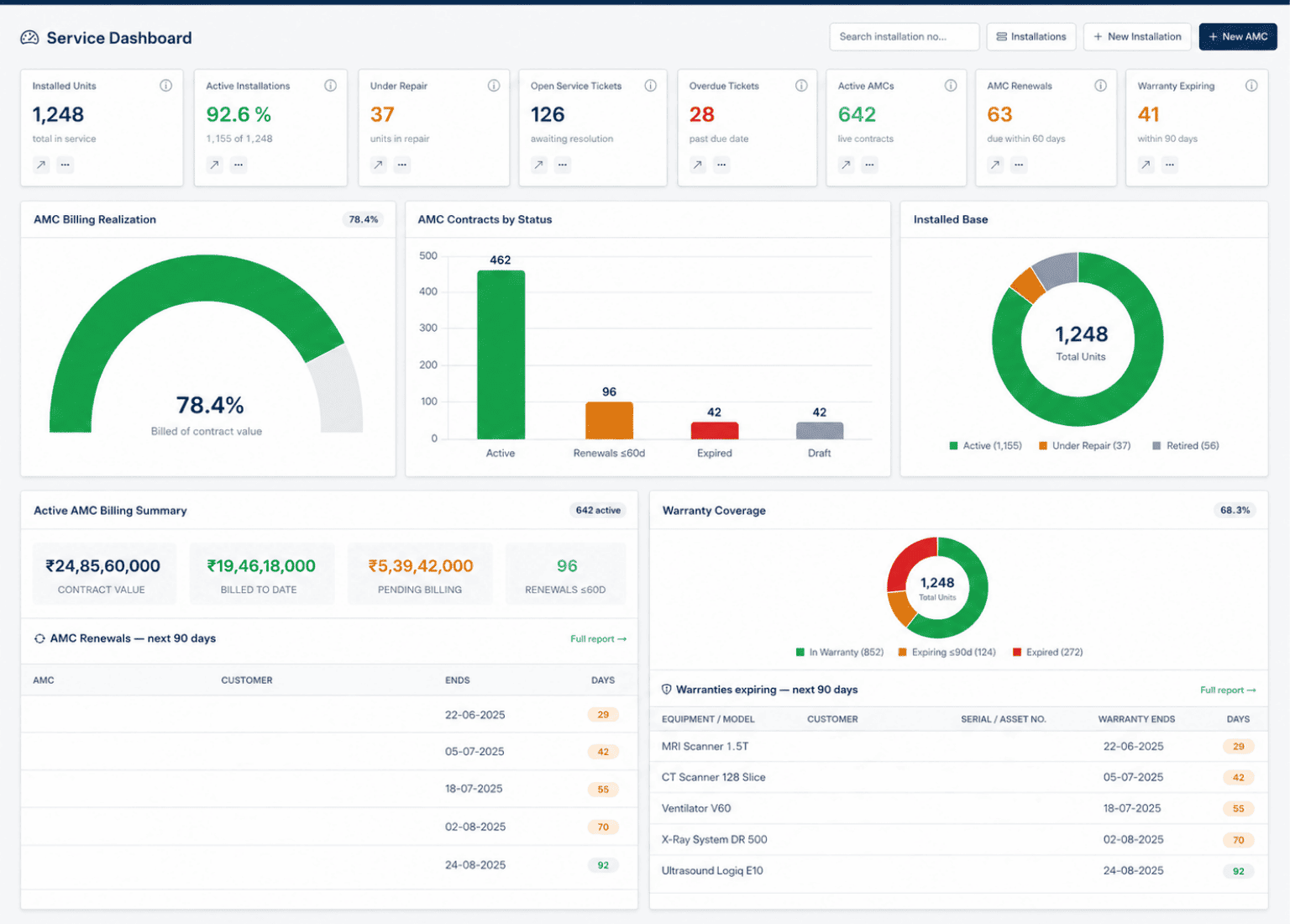
Managers should quickly review open tickets, overdue calls, AMC renewals, warranty expiry and service workload from one system.
Manage the Complete After-Sales Service Lifecycle
T3 OEM Service CRM connects installation, warranty, AMC, helpdesk tickets, spare parts and service reports in one after-sales workflow. Every customer asset remains traceable from installation and service support to ticket closure and contract renewal.

Register Installed Equipment
Create or automatically generate installed-base records for supplied products with customer, site address, serial number, lot number, quantity, installation date, warranty dates and assigned service engineer.
Manage Warranty and AMC Coverage
Identify whether equipment is under warranty, covered by an AMC or outside coverage. Create AMC contracts with contract value, GST, billing frequency, planned visits, validity dates and covered installations.
Manage Tickets, Visits and Spare Parts
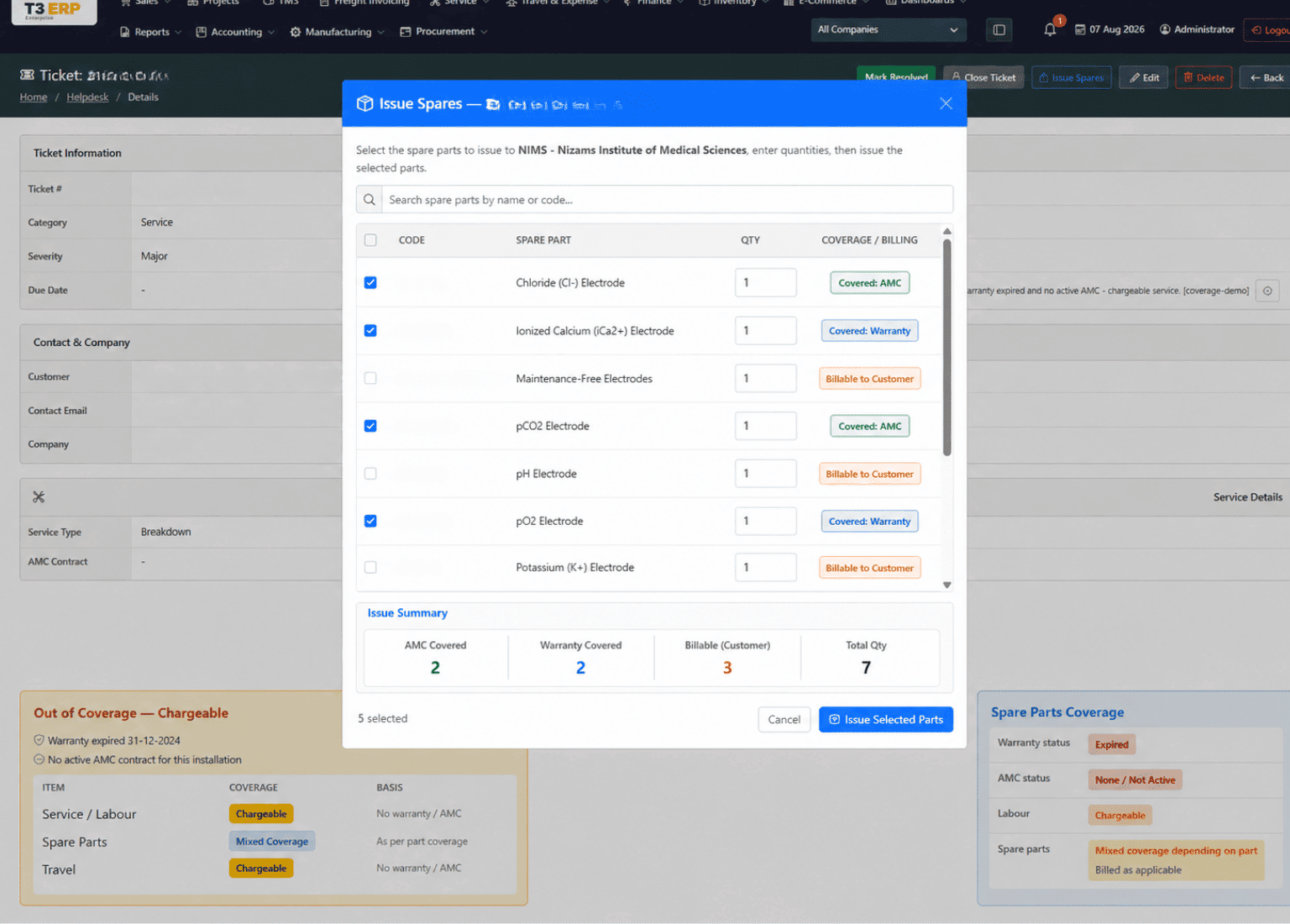
Raise breakdown, installation, preventive maintenance and AMC visit tickets against the correct installed unit. Engineers can issue compatible spare parts, record service activity and complete service reports.
Close Calls and Monitor Service Performance
Resolve service calls while retaining warranty and AMC coverage details for reference. Monitor installed units, active AMCs, warranty expiry, renewals, open tickets, overdue calls and SLA performance through dashboards.
Installed Base, Warranty and AMC Coverage Control
This section controls customer equipment records and determines how every service transaction should be treated. It helps OEM teams avoid confusion between warranty-covered, AMC-covered and chargeable service work.

Service Tickets, Spare Parts and Field Service Execution
Manage service calls through one connected workflow linking customer equipment, warranty or AMC coverage, compatible spare parts, engineer reports and ticket resolution.
Equipment-Linked Service Tickets
Create breakdown, preventive maintenance, installation and AMC visit tickets against the correct customer and installed unit, with priority, due date and issue details.
Live Coverage and Chargeability Check
View whether labour and spare parts are covered under warranty or AMC, or should be treated as chargeable, before completing the service activity.
Spare Parts Issue and Service Closure
Select compatible spares, process stock issue, record engineer service reports and resolution notes, and close the ticket with a complete service history.
Service Dashboards, Reports and Management Visibility
T3 OEM Service CRM gives service managers a clear view of installed equipment, ticket workload, warranty exposure, AMC renewals and overall after-sales performance from one central system.
Centralised After-Sales Service Visibility
View installed units, equipment under repair, open and overdue tickets, active AMCs, upcoming renewals and expiring warranties from one central service cockpit.
Why Choose T3 OEM Service CRM?
T3 OEM Service CRM is built for manufacturers and equipment suppliers that need complete after-sales control. It connects installed equipment, warranty, AMC contracts, service tickets, spare parts, service reports and renewal follow-ups in one connected CRM workflow.
Complete After-Sales Lifecycle
Manage installation, warranty, AMC contracts, tickets, spare-parts issues, service reports and invoicing through one connected workflow.
Consistent Coverage Decisions
Apply the same warranty, AMC and chargeable-service logic across installation, ticket and spare-part screens.
Company-Gated Service Module
Enable OEM service functionality only for selected companies, keeping the module inactive where service workflows are not required.
Uses Existing ERP Transactions
Connect customers, products, tickets, material requests, material-out entries and invoices without duplicating ERP masters.
Better Renewal Follow-Up
Monitor warranty expiry, AMC renewals, open tickets and overdue service calls before contracts or customer issues are missed.
Built for Multi-Site Teams
Manage service operations across Mumbai, Maharashtra and multiple customer locations from one central CRM system.
OEM Service CRM Software FAQs
Find answers about installed equipment tracking, warranty coverage, AMC contracts, service tickets and spare-parts management.
01 What is OEM Service CRM Software?
OEM Service CRM Software helps manufacturers manage after-sales service for equipment installed at customer sites. It connects installed-base records, warranty, AMC contracts, service tickets, spare-parts issues and service reports in one system.
02 Can T3 ERP track equipment by serial number?
Yes. Each installation can store the customer, product, serial or lot number, installation date, warranty period, assigned engineer, site address and linked service-ticket history.
03 How is free or chargeable service decided?
The coverage engine checks the active warranty first, then an active AMC and finally the out-of-coverage status. It uses this result to show whether service labour and spare parts are free or chargeable.
04 Can AMC contracts and renewals be managed?
Yes. T3 ERP supports AMC contract creation, contract types, coverage periods, billing schedules, linked installations, invoice generation and visibility into upcoming renewals.
05 Can spare parts be issued from a service ticket?
Yes. Compatible spare parts can be selected from an installation or service ticket. Stock movement, coverage status and billing treatment are then managed through the connected ERP workflow.
Ready to Improve Your OEM Service Operations?
Manage installed equipment, warranties, AMC contracts, service tickets and spare parts through one connected OEM Service CRM.