Customized Customer Service CRM In Mumbai
Track cases, complaints, and service requests from registration to resolution with a CRM configured around your support workflows, SLA policies, and escalation rules.
Unified Case Management from Complaint to Closure
Customer service operations generate a continuous stream of cases, complaints, and requests across multiple channels. When these interactions are tracked in email inboxes, spreadsheets, or disconnected tools, response times stretch, cases get lost, and service quality becomes inconsistent.
T3 Customer Service CRM centralises every customer interaction into a single system with defined workflows for case creation, assignment, escalation, and resolution. SLA timers track response and resolution commitments, while communication logs maintain a complete history of every touchpoint.
Common Service Challenges T3 CS CRM Addresses
Disorganized service operations directly reduce customer retention and increase operational overhead.
Cases Lost Across Channels
When complaints arrive via email, phone, and walk-ins with no central logging system, cases slip through the cracks and customers receive no follow-up.
SLA Breaches Without Visibility
Without automated SLA timers, teams cannot track which cases are approaching deadlines until the breach has already occurred and the customer has escalated.
No Ownership on Cases
Cases without clear assignment sit unattended. Multiple agents may work on the same issue or assume someone else is handling it, leading to duplication or neglect.
Incomplete Communication History
When interactions are stored in individual email accounts or notepads, agents handling follow-ups lack context and customers must repeat their issue each time.
Manual Escalation Bottlenecks
Escalations depend on agents remembering to notify supervisors. Critical issues remain at the wrong level until customers complain loudly enough to trigger attention.
No Reporting on Service Quality
Without structured data on resolution times, complaint categories, and agent performance, management cannot identify systemic issues or measure service improvements.
Modules Configured for Your Service Operations
Each module addresses a specific function in your customer service workflow and can be enabled or adjusted based on your team size and service policies.
Case Management
Register, categorise, and track service cases from creation to closure with configurable case types, priority levels, and status workflows.
Complaint Tracking
Log formal complaints with root cause classification, investigation notes, corrective actions, and closure verification workflows.
Service Request Portal
Capture structured service requests with request type, description fields, attachments, and automated routing to the appropriate team.
SLA Management
Define SLA rules by case type, customer tier, and priority. Track response and resolution timers with automated warnings before breach.
Escalation Engine
Configure time-based and condition-based escalation rules that automatically reassign or notify supervisors when cases exceed defined thresholds.
Communication Log
Record every interaction — calls, emails, notes, and internal remarks — against the case record with timestamps and agent identification.
Resolution Tracking
Document resolution actions, link corrective measures to cases, and enforce closure verification before marking cases as resolved.
Feedback Collection
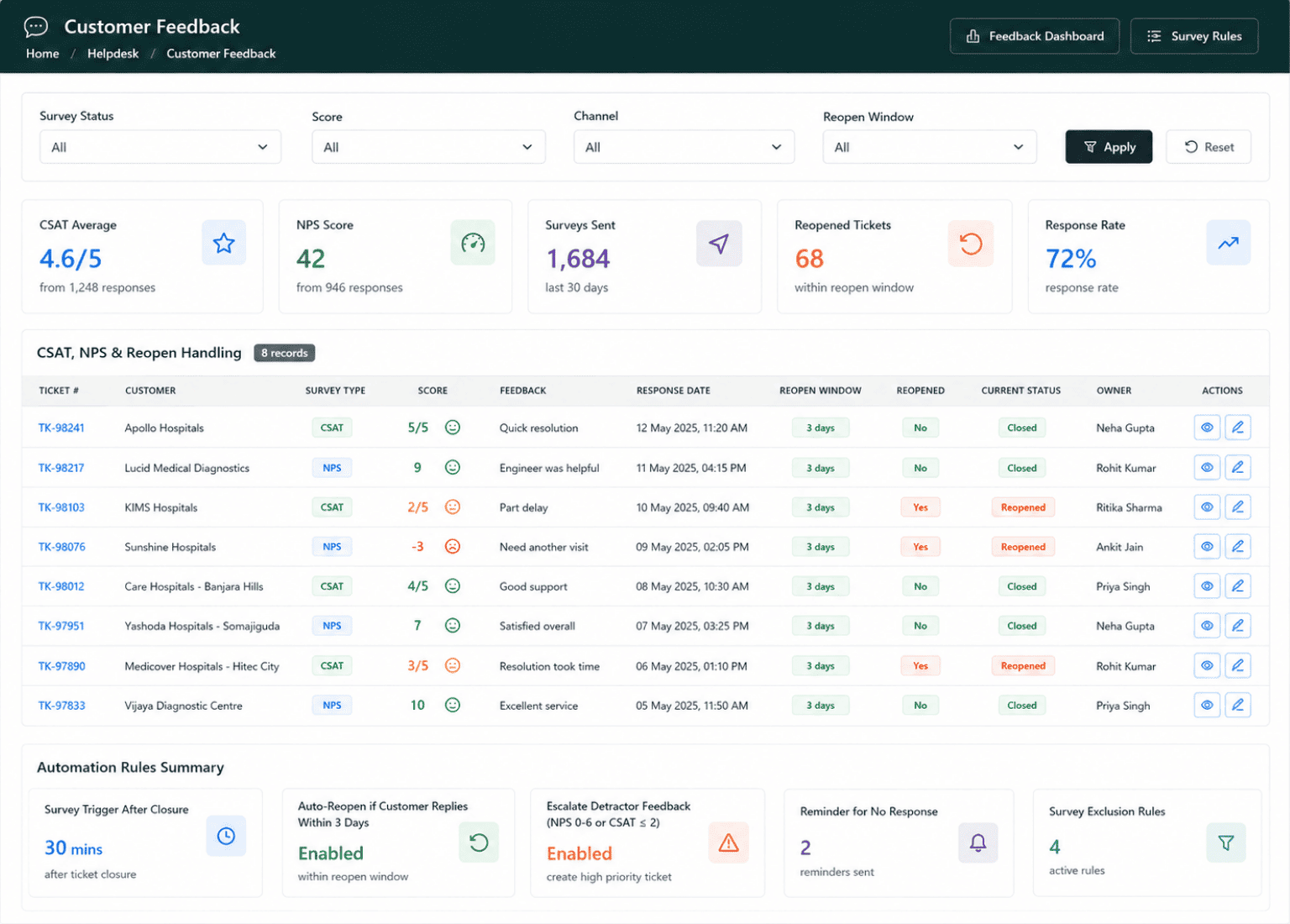
Collect post-resolution feedback from customers via configurable surveys linked to closed cases for service quality measurement.
Service Analytics
Dashboards and reports covering case volume, SLA compliance, resolution times, complaint trends, and agent workload distribution.
What Sets T3 Customer Service CRM Apart
T3 Customer Service CRM is built for structured service operations where accountability, SLA compliance, and resolution tracking are non-negotiable.
- Configurable case types with custom fields and status workflows
- Multi-channel case registration — phone, email, walk-in, web form
- SLA timers with automatic warnings and breach notifications
- Time-based and condition-based escalation rule engine
- Complete communication log per case with agent attribution
- Root cause analysis fields for complaint categorisation
- Post-resolution customer feedback surveys
- Agent workload dashboard with case assignment balancing
- Customer history view showing all past cases and interactions
- Attachment support for screenshots, documents, and correspondence
- Configurable notification rules for case updates and assignments
- Role-based access for agents, supervisors, and service managers
Service Operations Workflow in T3 CS CRM
A structured flow from case registration through resolution and feedback.
Case Registration
Log the customer issue with category, priority, contact details, and supporting attachments. System assigns a unique case ID and starts the SLA timer.
Assignment & Ownership
Cases are routed to the appropriate team or agent based on category, skill set, and current workload. The assigned agent takes ownership.
Investigation & Communication
Agent investigates the issue, logs all interactions with the customer, and records internal notes. SLA timer tracks elapsed time.
Escalation (If Required)
If the case exceeds time thresholds or meets escalation criteria, the system automatically escalates to the next level with full context.
Resolution & Closure
Agent documents the resolution, marks corrective actions, and submits for closure verification. The case is closed with a complete audit trail.
Feedback & Reporting
Customer receives a feedback request. Service managers review dashboards for SLA compliance, resolution trends, and team performance.
Track Every Support Metric That Matters
Monitor ticket volumes, agent performance, and customer satisfaction from a centralized reporting console.
Ticket Volume Analysis
Track daily, weekly, and monthly ticket counts segmented by category, priority, and channel.
SLA Compliance Dashboard
Monitor response and resolution times against defined SLA targets across all service queues.
Customer Satisfaction Trends
Visualize CSAT and NPS scores over time, filtered by agent, team, or issue category.
Agent Productivity Report
Compare tickets handled, average resolution time, and reopened cases per support agent.
Escalation Tracking Report
Review escalation frequency, reasons, and outcomes to identify recurring service gaps.
First Contact Resolution Rate
Measure the percentage of issues resolved in a single interaction without follow-ups.
Benefits of T3 Customer Service CRM
Accountable Case Handling
Every case has a clear owner, defined SLA, and documented resolution path — eliminating gaps in follow-up.
SLA Compliance Visibility
Real-time SLA tracking with proactive warnings ensures service commitments are met consistently across the team.
Complete Service History
Full communication logs and case records per customer provide agents with context for faster, informed responses.
Data-Driven Service Improvement
Structured reporting on complaint patterns, resolution times, and feedback scores highlights where service processes need attention.
Businesses That Benefit from T3 Customer Service CRM
T3 Customer Service CRM is designed for organisations where structured service delivery and complaint resolution are operational requirements.
Customer Support Teams
Teams handling inbound complaints, queries, and requests across phone, email, and walk-in channels with SLA obligations.
B2B Service Providers
Companies managing service contracts, issue resolution, and client communication with defined response commitments.
Product & Manufacturing Companies
Businesses tracking product complaints, warranty claims, and after-sales service with root cause documentation.
Financial & Insurance Firms
Institutions handling customer grievances, policy-related queries, and regulatory complaint tracking with audit requirements.
Healthcare Facilities
Hospitals and clinics managing patient feedback, service complaints, and operational requests with escalation protocols.
Facility & Property Managers
Managing tenant complaints, maintenance requests, and service vendor coordination with resolution tracking.
Configure Customer Service CRM Around Your Workflows
Adapt ticket categories, escalation rules, SLA definitions, and agent routing to match your support operations exactly.
- Custom Ticket Categories & Sub-types
- Configurable SLA Rules per Priority Level
- Auto-Assignment Rules by Channel or Skill
- Custom Escalation Matrices
- Branded Customer Portal Templates
- Custom Satisfaction Survey Forms
- Role-Based Agent Dashboards
- Configurable Case Status Workflows
Connect Customer Service CRM with Your Existing Systems
Bridge your support workflows with telephony, email, and business management tools through built-in connectors.
Telephony & IVR Integration
Connect with PBX and IVR systems to log calls, route tickets from phone interactions, and track call-based SLAs.
Email & Communication Sync
Sync incoming support emails into the ticketing queue and track complete conversation threads per case.
ERP & Billing System Link
Pull customer account details, invoice history, and contract terms from your ERP to give agents full context during support.
How We Implement T3 Customer Service CRM
A structured approach from service process mapping to go-live and continuous improvement.
Service Process Mapping
We document your current case types, SLA policies, escalation rules, team structure, and communication channels.
System Configuration
Configure case workflows, SLA timers, escalation rules, notification templates, and user roles based on the process map.
Data Migration & Training
Import existing case data and customer records. Train service agents, supervisors, and managers on the configured system.
Go-Live & Optimization
Deploy the system with dedicated support during initial operations. Review SLA compliance and adjust configurations as needed.
Customer Service CRM — FAQ
Yes. Each case type — complaint, service request, query, warranty claim — can have its own status workflow, required fields, SLA rules, and escalation paths.
SLA rules are defined by case type, priority, and customer tier. The system tracks response and resolution timers automatically and sends warnings before breach and notifications upon breach.
Yes. The customer profile displays all past cases, complaints, communications, and feedback in chronological order, giving agents complete context before responding.
Escalation rules are configurable by time thresholds and case conditions. When triggered, the system reassigns the case and notifies the escalation recipient with the full case context.
Yes. Feedback surveys can be triggered automatically upon case closure. Responses are linked to the case record and feed into service quality reports.
Implementation typically takes 3 to 6 weeks depending on the number of case types, SLA complexity, team size, and integration requirements with existing systems.
Related Solutions
Related Industry Solutions
Configure Your Customer Service CRM
Every service team has different case types, SLA requirements, and escalation needs. Talk to our team about configuring T3 CS CRM for your operations.